
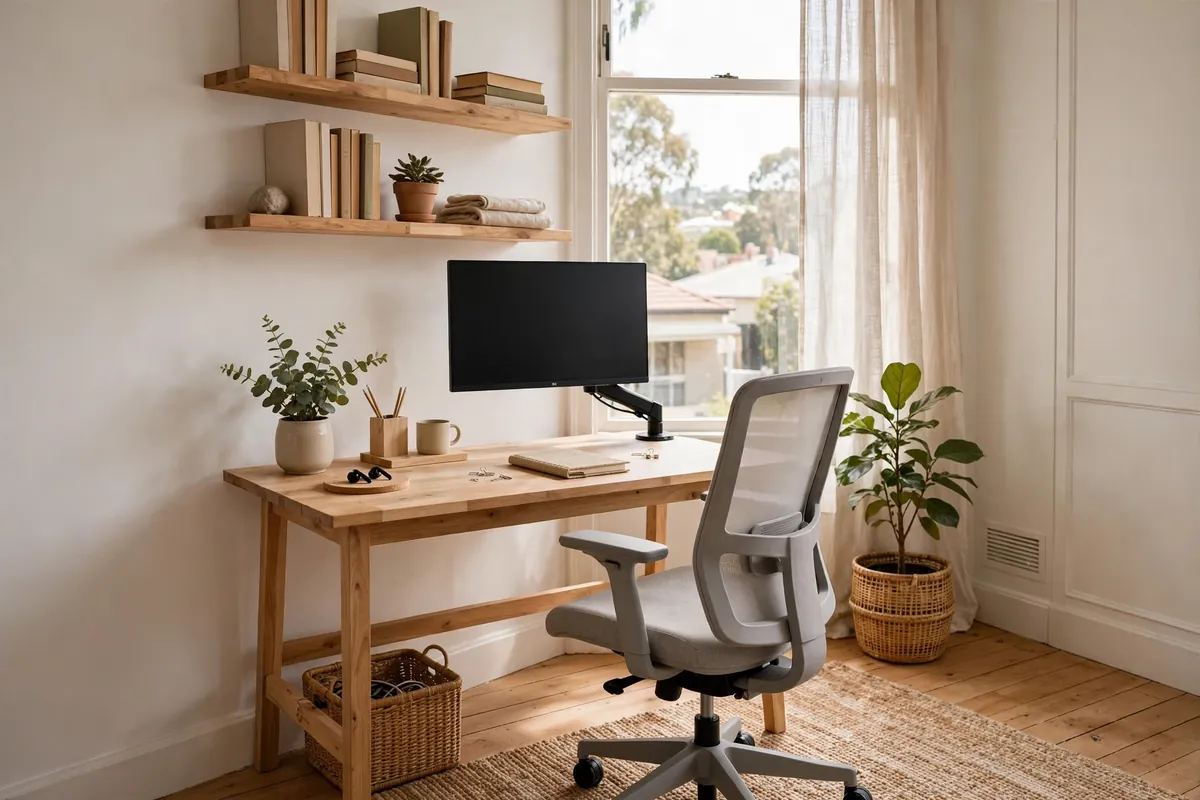
Working from home is no longer a temporary arrangement for most Australians — it’s how millions of us work every week. Yet many home offices are still afterthoughts: a laptop on the dining table, a spare bedroom with a wobbly desk, or a corner of the living room that never quite feels like a proper workspace.
A well-designed home office doesn’t need a dedicated room or a big budget. What it needs is deliberate planning around the three things that actually affect your workday: ergonomics, lighting, and boundaries. Whether you’re setting up in a spare room, a nook, or a studio apartment, here’s how to create a home office that helps you do your best work.
Choosing the Right Spot
Before buying a single piece of furniture, pick the right location. The best home office spot in an Australian home has:
- Natural light — ideally from the side, not directly behind or in front of your screen (glare is the enemy of productivity)
- A door you can close — for video calls, concentration, and the psychological boundary between work and home
- Distance from high-traffic areas — away from the kitchen, living room TV, and kids’ play zones if possible
- Ventilation — a room that gets stuffy by 2pm will kill your afternoon focus
Spare bedrooms make the best home offices because they tick all four boxes. But don’t overlook underused spaces: a wide hallway, a converted garage corner, a garden studio, or even a large wardrobe (the “cloffice” trend) can work brilliantly with the right setup. For ideas on making the whole home work harder, see our guide to energy-efficient home design — good passive design keeps your office comfortable year-round without cranking the aircon.
How Much Does a Home Office Setup Cost?
Home office costs in Australia scale with your ambition. As a 2026 guide:
- Basic setup: $500–$2,000 — a decent desk, an ergonomic chair, and basic lighting. Enough for part-time or casual use.
- Proper home office: $2,000–$5,000 — quality sit-stand desk, good ergonomic chair, monitor arm, task lighting, and storage. The sweet spot for full-time remote workers.
- Dedicated office room: $5,000–$15,000 — full room fitout with built-in joinery, acoustic treatment, proper lighting design, and premium furniture.
The chair is where your money matters most. You’ll spend more hours in your office chair than in your bed — budget $400–$800 for a proper ergonomic chair with lumbar support and adjustable arms. A $150 office chair from a discount store will cost you more in physio bills within a year.
Ergonomics: The Non-Negotiables
Ergonomics isn’t about expensive gadgets — it’s about setting up the basics correctly. Get these right and you’ll avoid the neck pain, back ache, and headaches that plague home workers:
- Monitor at eye level — the top of your screen should be at or slightly below eye height, about an arm’s length away. Use a monitor arm or a stack of books if needed.
- Feet flat on the floor — with knees at roughly 90 degrees. If your feet dangle, get a footrest.
- Elbows at 90 degrees — your desk height should let your forearms rest parallel to the floor when typing.
- 20-20-20 rule — every 20 minutes, look at something 20 feet away for 20 seconds. Your eyes will thank you.
A sit-stand desk ($400–$900 for a good electric model) is worth considering if you work full-time from home. Alternating between sitting and standing through the day reduces back strain and keeps energy levels steadier. You don’t need to stand all day — even 30 minutes here and there makes a difference.
Lighting for Productivity
Bad lighting causes eye strain, headaches, and that drained feeling at 3pm. Good lighting is one of the cheapest productivity upgrades you can make.
Natural Light First
Position your desk perpendicular to the window — this gives you daylight without screen glare or squinting. North-facing rooms (in Australia) provide the most consistent, glare-free daylight. If your only option faces east or west, a sheer curtain diffuses harsh morning or afternoon sun.
Layer Artificial Light
Don’t rely on a single ceiling light. You need:
- Ambient light — a ceiling light or floor lamp for general illumination
- Task light — an adjustable desk lamp for focused work, ideally with adjustable colour temperature
- Bias light — a soft light behind your monitor reduces eye strain during evening work by balancing screen brightness with the room
For video calls, face the window or put a soft light in front of you — never behind you, or you’ll look like a silhouette. A simple ring light or panel light ($30–$80) makes an enormous difference to how professional you look on camera.
Small Space Home Office Ideas
No spare room? These ideas work in tight Australian homes and apartments:
The Hallway Office
A wide hallway (1.2m+) can fit a slim 400mm-deep desk against the wall. Use a wall-mounted fold-down desk that disappears when the workday ends. Add a picture light above for task lighting.
The Bedroom Corner
Zone a corner of the master bedroom with a rug, a room divider, or a different paint colour. The key is creating a visual boundary so your brain registers “office” versus “bedroom.” A curtain on a ceiling track is a cheap, effective divider.
The Under-Stair Nook
The space under stairs is often wasted. A custom desk fitted into the nook, with shelving following the stair angle above, creates a surprisingly functional workspace. Add LED strip lighting under the stairs — it’s usually dark in there.
The Balcony Office
In mild Australian climates, a covered balcony can work for part of the year. You’ll need weatherproof furniture, reliable Wi-Fi, and a plan for hot days and rainy weeks. It’s not a year-round solution, but it’s a glorious one in spring and autumn.
Storage and Cable Management
Clutter kills focus. Every home office needs:
- Closed storage — a filing cabinet, drawer unit, or cupboard for documents and supplies. Open shelves look nice but accumulate visual noise.
- Cable management — a cable tray under the desk, velcro ties, and a single power board. Tangled cables are distracting and look terrible on video calls.
- A “shutdown” ritual spot — a drawer or box where your laptop, notebook, and work bits go at the end of the day. Out of sight, out of mind — this is how you stop working from home from becoming living at work.
Sound and Privacy
Australian homes — especially apartments and townhouses — aren’t known for great sound insulation. If you’re on calls all day:
- Soft furnishings absorb sound — a rug, curtains, and upholstered furniture reduce echo dramatically
- A solid-core door beats a hollow-core door for blocking household noise
- Acoustic panels ($50–$150 for a pack) on the wall behind you improve both sound quality and how you look on video
- Noise-cancelling headphones — a $200–$400 investment that pays for itself in sanity if you share your home during work hours
Frequently Asked Questions
How much does it cost to set up a home office in Australia?
A basic home office setup costs $500–$2,000 for a desk, chair, and lighting. A proper full-time setup with an ergonomic chair, sit-stand desk, and monitor arm runs $2,000–$5,000. A full dedicated office room fitout with built-in joinery costs $5,000–$15,000.
What is the best location for a home office?
The ideal spot has natural light from the side, a door you can close, distance from noisy living areas, and good ventilation. Spare bedrooms are best, but hallway nooks, under-stair spaces, and converted garage corners can all work with thoughtful planning.
Do I need a permit for a home office renovation?
Fitting out a home office with furniture and joinery generally doesn’t need council approval. If you’re building a garden studio, converting a garage, or doing structural or electrical work, check with your local council — requirements vary by state and local government area.
Can I claim home office expenses on tax in Australia?
Yes — the ATO allows deductions for home office running costs. You can use the fixed-rate method (a set rate per hour worked from home) or the actual-cost method (claiming a proportion of utilities, internet, and depreciation). Keep a diary of your work-from-home hours. Consider speaking to a tax professional for advice specific to your situation.
What’s the ideal desk size for a small home office?
A desk 1200mm wide by 600mm deep is the practical minimum for a laptop plus monitor setup. If you use dual monitors or need space for paperwork, go for 1500–1800mm wide. In very tight spaces, a 900mm-wide desk works for laptop-only use, and wall-mounted fold-down desks save floor space entirely.